How to Self-Shoot a Video Testimonial
We all have pretty great video cameras in our pockets now a days, so self-shooting, or having a client shoot their own a video testimonial is a more reasonable strategy than it has been in the past. However, no matter how advanced and top-of-the-line camera tech is bundled in a smartphone or laptop, there are still a number of best practices one can do to ensure they look and sound great on camera. The tips can be broken down into four categories:
- Camera -- Angle, Height, Composition, Orientation, and Resolution
- Lighting -- Bright, even light
- Audio -- Record in as quiet of a room as possible
- Appearance -- Don't forget how you and your environment look on camera
Camera
Angle, Height and Composition
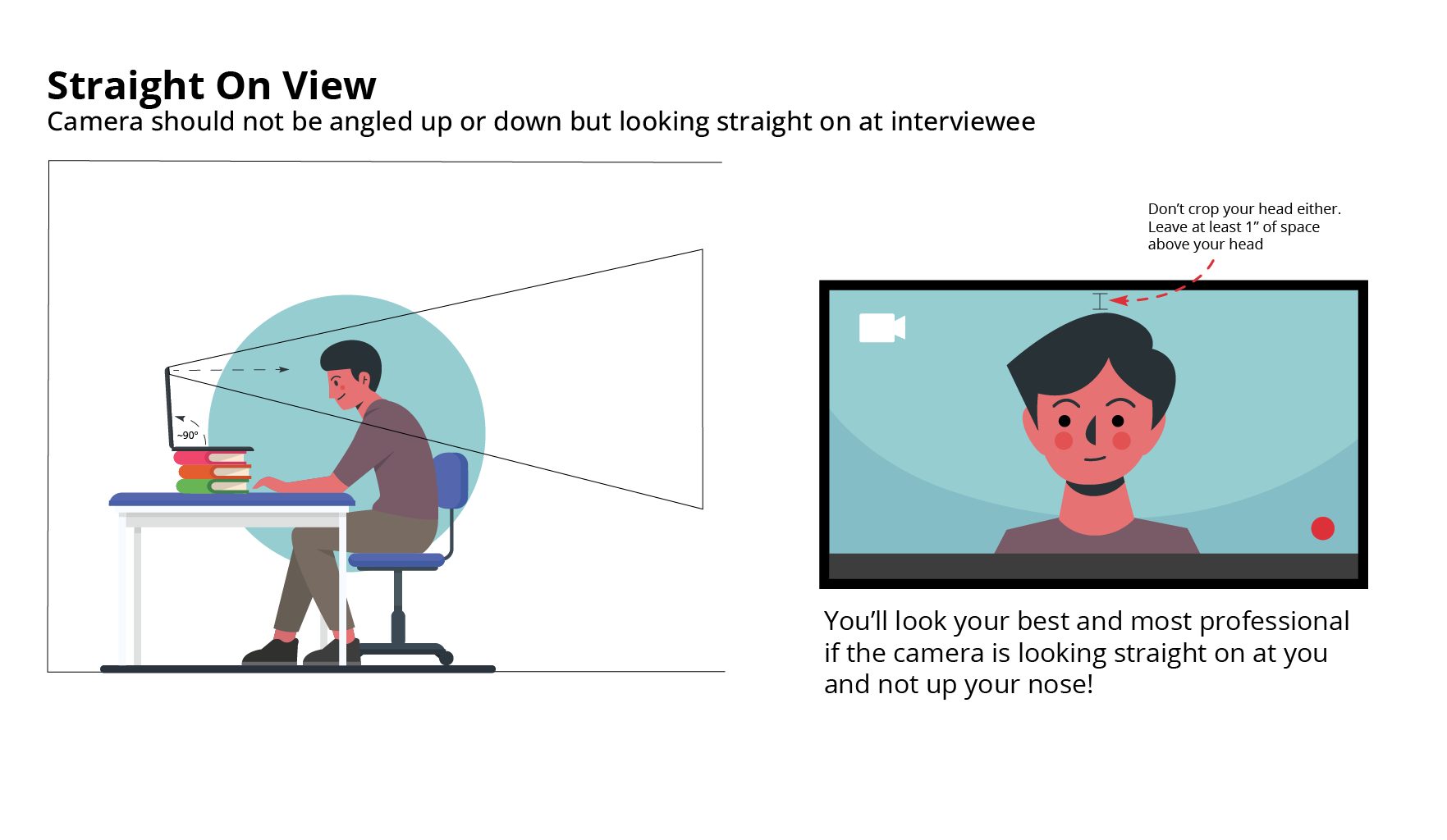
Position laptop/phone so that you are looking at the camera at eye level. Your head should be about 2/3rd of the way up the screen with a small bit of space above your head. Your whole face and the top of your shoulders should be in frame.
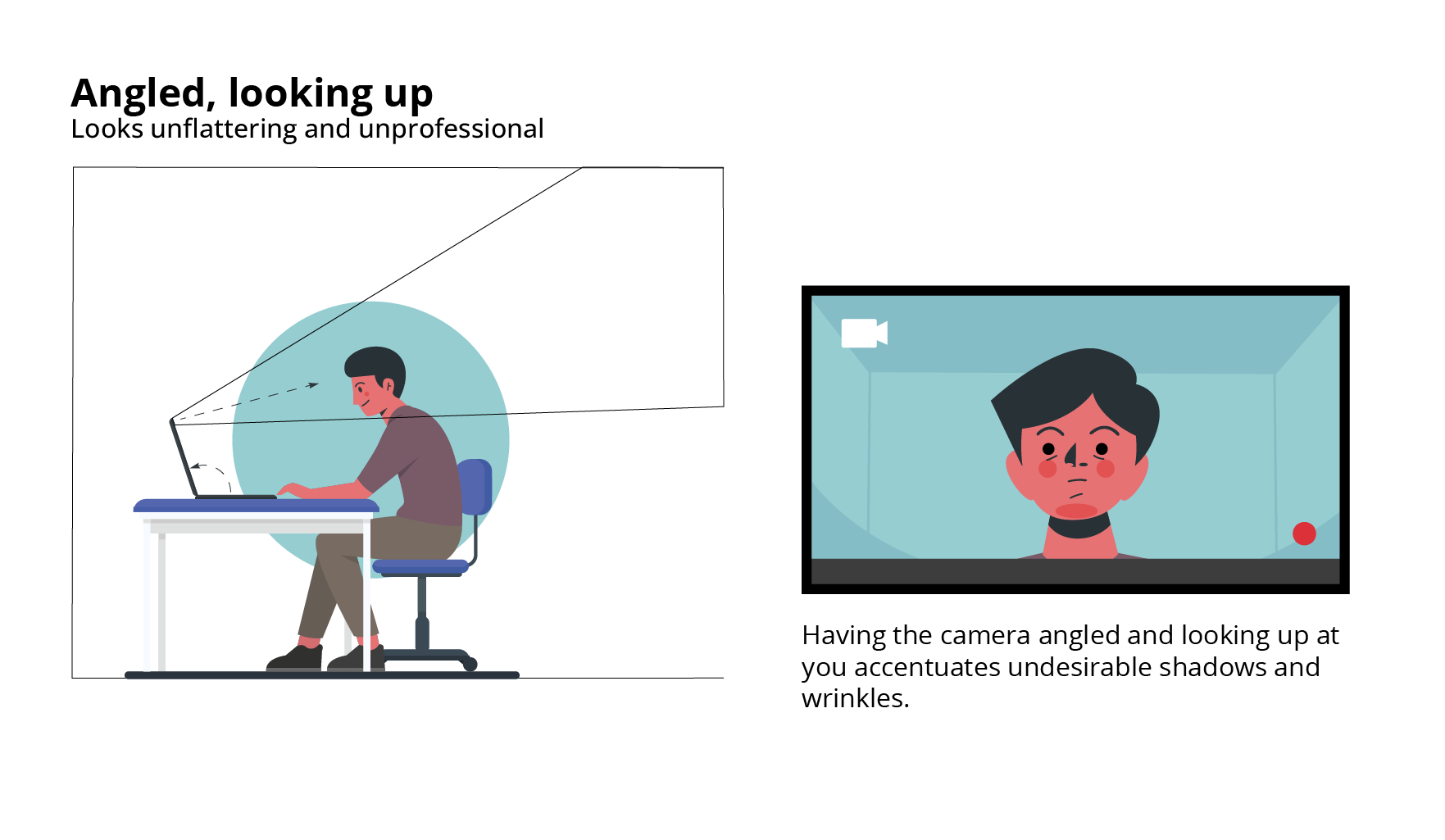
- Angle: Camera should not be angled up or down but looking straight on at interviewee (imagine a news anchor). If your ceiling is showing, the camera is angled looking up at you (and looking up your nose!)
- Height: To achieve a straight on angle, this frequently means propping the laptop up on a stack of books to get it eye level. And in the case of the phone, propping it on a phone stand or selfie stick (still plugged into power)
- Composition: Don't allow the top of your head to be cropped. About mid-chest and up is usually best.
|
| If you want your webcam looking up your nose... |
|
| Correct Positioning of a webcam on a laptop |
Camera
Orientation and Resolution
Unless directed otherwise, shoot horizontally. The camera on your laptop or phone will most likely suffice. If you have a high-quality webcam, or other camera attachment, then by all means use that. If you do have an external camera or webcam you are using, make sure it follows the Angle/Positioning rules above.
- Orientation: Record horizontally or landscape wise. This is particularly important for phone. There are exceptions though for sites like Tik Tok and Snapchat, so ask if unsure.
- Resolution: Most cameras default to 1920x1080 but you have the ability and technical know-how, by all means, change the resolution to 4K which is 3840x2160 or 4096x2160, giving the editor even better footage to work with.
Lighting
Natural light is your best friend. Ideally shoot in well-lit room with big, bright windows, using as much natural light as you can. If you don't have a room with natural light, use a room with as much light as you can.
- Do not sit in front of a bright window because it will backlight you. A window can be to the side or in front of you. If there is overly bright sunlight coming in, a shade or curtain would be good to diffuse the light.
- Avoid sharp contrasts such as high light spots or shadows on your face.
- Maintain eye contact with the camera (it's tempting to look at the face of the director you'll be speaking to but the camera is your audience.
- Adding an additional light in front of you such as a ring light or even a household lamp will help eliminate or smooth out any shadows on your face.
Audio
Audio is incredibly important. In fact, it is just as important as the video! No matter how good a video looks, it's unusable if we can't hear you.
You can't always control the sound scape around you but some things you can do to make your audio as good as your video is:
- Record in a quiet room. Close the door, keep pets and children out. If there is loud noise outside your window, such a lawn mower or loud traffic, perhaps choose a different room (however, if it's good lighting vs audio quality, leave that up to your director to choose)
- Speaking loudly and enunciate. No need to rush.
- Air pods or simple bluetooth earbuds are not good alternatives for a mic. Your device's internal mic will likely do better as it is hardwired in so there is no reliance on bluetooth. Also, you wouldn't want those earbuds appearing on camera!
- If recording outdoors, avoid windy day, traffic on roads, lawn mowers, an overly enthusiastic birds chirping.
Appearance
Your appearance
For an in-depth advice you can refer to our How To Look Your Best for Video at this link
- Dress professionally (at least the waist up :)
- Wear solid colors. No distracting or complex patterns.
- Remove shine from your face. Translucent powder or oil absorbing sheets are great
- If you need to read from notes, it is better if you read from a document on the computer screen and not from written or printed notes. Your eyes will be darting away to look at your notes. Although having text on screen doesn't eliminating the dart eye movement completely, it helps reduce it compared to if you're looking down at your notes.
- Want to look good? Refer back to the camera's angle and height referenced above. You'll look your best and most professional if the camera is looking straight on at you, not up your nose and at the ceiling!
Your environment
A neutral wall at least 4 feet behind you is a safe bet but to be more engaging, a few well-placed books, plants or items relevant to the interview would be ideal. Please, nothing directly behind your head. Items should also be at least 4 feet behind you.
Depending on the message you want to convey, you'll want to try to choose a location that supports your image. For example, if you're a business person or academic, doing the interview in your office is preferable to your kitchen. If you're speaking more as a regular, relatable person, doing the interview from your home makes sense. A bedroom, however, is rarely suitable.
- Depth is good but avoid clutter
- Items in the background can add interest but less is more
- No fake or blurred backgrounds for the video please. Blurred backgrounds make videos look unprofessional and makes you look unprepared.
Review
Lastly, review the footage you shoot! Ideally, even shoot several takes so the editor has options to choose from.
A bit intimidated now with the prospect of recording your video yourself? Feel welcome to reach out to us at hello@kohlitz.com to get an expert to shoot your video instead.